- ACC contracts
- EAP providers
- Insurers
- Employers
- Self-funded
Stop juggling diaries, spreadsheets, and referral portals.
Everything a solo practice runs on, whoever refers or funds the work. No tiers, and nothing charged per client, booking, or session.
Booking requests
Clients ask through your public link. Each request is matched against your availability before you accept.
Calendar sync
Connect Google Calendar so personal commitments block out your working hours. Outlook and iCloud are coming soon.
Availability, set once
Weekly hours, date overrides, and your profile timezone. Rooms or telehealth on every session.
Unlimited clients
Unlimited clients, sessions, and booking requests. Your price never grows with your caseload.
Every session, every request, one calendar.
Month, week, and day views sit over the same filterable sessions list, whether a client came through a referral partner or booked with you directly.
- Weekly hours, date overrides, and timezone, set once
- Rooms or telehealth, duration, and status on every session
- Google Calendar sync, with Outlook and iCloud coming soon


Only the times you are actually free
Whether you book a session yourself or a client asks through your public link, Addison offers the times your availability allows, and checks each request before you accept it.
Your booking link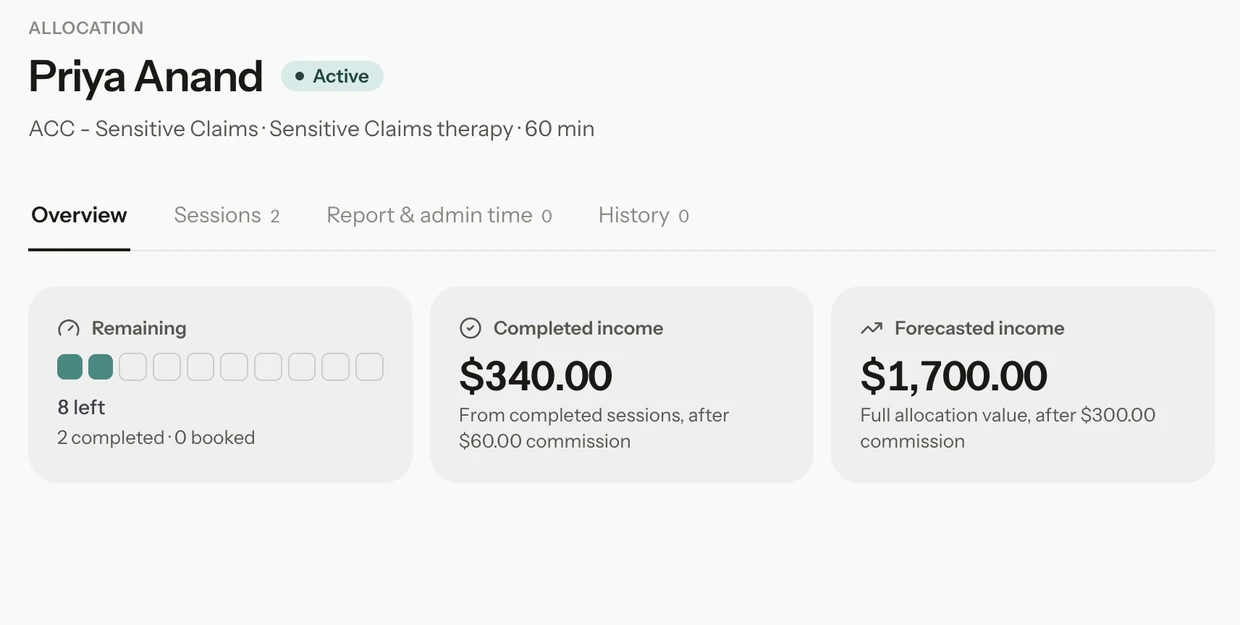
Know what is funded before you deliver it
Track funded blocks of sessions or hours per client against any funder. Addison counts down what is left as sessions complete, so nothing funded expires unused.
Explore allocations
Your week on one page
Today pulls your agenda, the week's sessions and earnings, new booking requests, and every session still waiting for an outcome or a funder into one place, so nothing slips between appointments.
Explore insightsThe part of your practice you can't cover yourself.
Build the plan once from a short list of actions, each written in plain language and switched on by you. A trusted contact can start it. Everything after that runs on its own.
How contingency worksYour clients’ information, handled with care.
Addison is made by Mayhem Labs Limited in Aotearoa New Zealand. It holds what your schedule runs on, not your clinical notes.
Holds less, by design
Addison holds what your schedule runs on, not your clinical records. Notes, reports and assessments stay wherever you already keep them, and what Addison does hold is protected with appropriate security and encryption measures.
SecurityData requests
If you, or a client of yours, want to see or correct the information Addison holds, our data requests page sets out how to ask.
Data requests
Shaped inside a working practice.
Addison was built alongside practising clinicians from day one. Their sessions, their funders and their language decided what it does and how it says it. Tamsyn was Addison's first customer and helped build it, running her own practice on it and telling us plainly what did not work.
A missed session is a DNA, never a no-show. You are "unavailable", never "declining" a client. The vocabulary came from the practice, not a product meeting.
Tamsyn ran her practice on Addison from the first beta. What slowed her week down set what got built next.
Anything a client receives says exactly what happened and how to rebook or reply, because some of those clients will be reading it on a hard day.
Addison benefits from clinical practice input from Tamsyn Berthelsen, a registered clinical psychologist and Director of TJB Clinical Psychologist Ltd.
Tamsyn is currently trialling Addison from the perspective of a practising clinician and providing feedback on how the platform functions in the realities of day-to-day private practice. This includes areas such as funder allocation tracking, the information clinicians need when considering booking requests, and the practical management of caseloads when a clinician becomes unavailable.
Her input is grounded in her own professional experience and is provided within the scope of her clinical expertise and professional and ethical obligations. Through practical use of the platform, she identifies areas that work well, as well as areas where workflows could be clearer, safer, or better aligned with clinical practice. This feedback helps inform the ongoing development and refinement of Addison.
Tamsyn’s role is advisory and consultative only. She does not develop, operate, manage, secure, certify, or provide regulatory or legal approval of the Addison platform. Responsibility for the design, development, operation, security, privacy, regulatory compliance, and implementation of the product remains with Addison and its operators. Individual clinicians and organisations remain responsible for determining whether and how Addison is appropriate for use within their own professional, ethical, contractual, and regulatory obligations.
For transparency, Tamsyn and Addison’s founder have a pre-existing personal friendship. This relationship is disclosed openly and does not alter the professional and ethical standards that guide Tamsyn’s clinical input.
Up and running in an afternoon.
An afternoon to move your schedule and allocations across. Twenty minutes to write the plan you hope you never need.
- 01
Set your hours and connect your calendar
Weekly hours, date overrides and your timezone, set once. Connect Google Calendar so personal commitments block out time.
- 02
Add clients and their funded allocations
Record each allocation against its funder, in sessions or hours, with an end date. The count starts right and moves as you work.
- 03
Write your contingency plan
Nominate a trusted contact, switch on the actions that apply and rehearse it once. About twenty minutes.
Built for a funded, solo practice.
Diaries and spreadsheets work until the week they don’t. General booking tools are built for any business. Addison is built around funders, caseloads and the clients reading your emails.
| Diaries and spreadsheets | General booking tools | Addison | |
|---|---|---|---|
| Booking requests | Phone and email back and forth | Self-booking, often straight into your diary | Requests checked against your availability, and you decide |
| Funded sessions | A spreadsheet, updated by hand | Not built around funders | Counted down from each completed session |
| Income | Worked out at invoicing time | Payments taken, not funded work | Completed and forecast income per allocation |
| If you are suddenly unavailable | A note somewhere, if anywhere | Not part of the product | A written, rehearsed contingency plan |
| The words clients read | Whatever you write each time | Written for any kind of business | Written for therapy, and every email leaves a door open |
One plan. Everything in it.
No tiers, no per-feature pricing, and no charge for the contingency plan you hope you never use.
- Unlimited clients, sessions, and booking requests
- Contingency planning, rehearsal, and the printable document
- No per-client, per-booking, or per-session charges
- Availability schedules, date overrides, and timezone handling
- Allocation tracking for any funder, with completed and forecast income
- Google Calendar sync, with Outlook and iCloud coming soon
Questions clinicians ask first
How is my clients’ information protected?
Addison holds what your schedule runs on, not clinical notes, reports or assessments. What it does hold is protected with appropriate security and encryption measures, and a trusted contact can never see your client list, notes or any clinical data.
Can I cancel, and take my data with me?
The monthly plan can be cancelled any time.
I’m moving from another system. How long does it take?
Plan on an afternoon: set your availability, connect your calendar, then add your clients and their funded allocations. Clinical notes stay where they are, so there is nothing clinical to move.
What can a trusted contact see?
Nothing clinical. They can activate your contingency plan, and that is all. There is no screen that shows them your client list, notes, session detail, allocations, or income.
How does Addison handle ACC and EAP allocations?
Each allocation carries its funder and service, sessions or hours, a start date and usually an end date. Mark a session completed and the remaining balance moves. Cancel it and it does not. You see what is left, completed income and forecast income for every allocation.